OpenClaw安装
Linux(debian)
环境
node.js
sudo apt update
sudo apt install -y nodejs

# 验证
node -v
git
sudo apt install git
# 验证
git --version
安装
curl -fsSL https://openclaw.ai/install.sh | bash配置和使用
◆  Select sections to configure
│  ○ Workspace
│  ● Model (Pick provider + credentials)
│  ○ Web tools
│  ○ Gateway
│  ○ Daemon
│  ○ Channels
│  ○ Skills
│  ○ Health check
│  ○ Continue
核心配置 模型,可选择免费的Qwen
如果需要使用TG等软件则需要配置 Channels,配置对应的 TGbot token,即可在通过bot使用。
也可使用TUI对话:
openclaw tui如需修改配置:
openclaw configureWindows
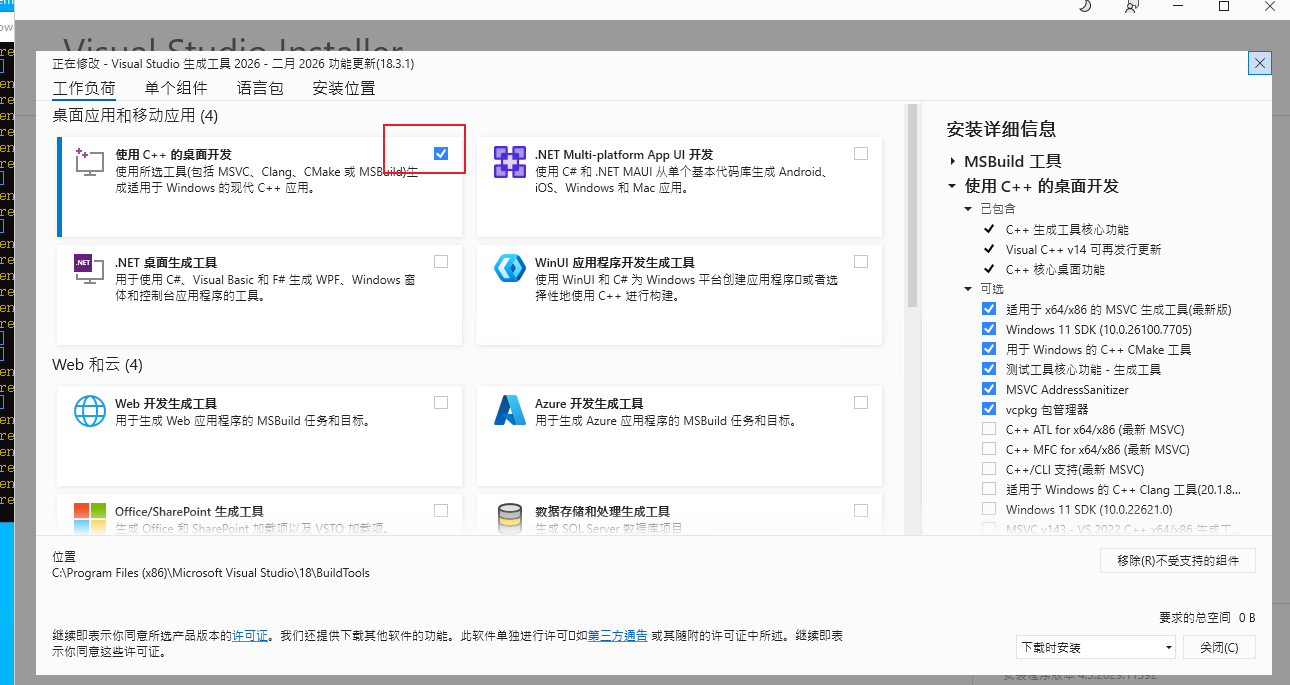
Windows安装配置基本相同,注意环境需要 C++ runtime
下载地址 https://visualstudio.microsoft.com/zh-hans/visual-cpp-build-tools/
PowerShell一键命令
iwr -useb https://openclaw.ai/install.ps1 | iex
文章目录